20091128

Alternative Browsers for Linux

All I can say right now is wow. Having been a long time user of Firefox, it's been a while since I last used a different browser under Linux... well... because there really weren't any better alternatives for a long time.

However, since webkit-gtk has been stabilizing lately, I decided to check out a couple of alternative browsers that were mentioned in the Linux Browser Shootout - namely Midori and Epiphany. I already tried Chrome (Chromium) a while ago and was quite impressed. What I really liked about Chrome was a) that it was blazingly fast, and b) that it did a great job of importing my Firefox preferences and bookmarks. There are still a few other issues with Chrome though. For example, some Flash functionality does not work properly. I'm sure that will be sorted out eventually.

So anyway, on to the good stuff. Most people are familiar with Epiphany (formerly Galeon) when it used the Gecko rendering engine (from the Mozilla project). Epiphany is the official browser of the Gnome desktop, if I'm not mistaken. Back when it was based on Gecko, it was good but just seemed like a less featured version of Mozilla or Firefox. Ever since they changed the default rendering engine to WebKit, it has been blazingly fast. Epiphany still suffers from having too few preference settings for the 'advanced' user. Also, when in full screen mode (which I tend to use frequently while browsing on my EEE 701) there is an annoying button at the top-right that says 'Leave Fullscreen', and it doesn't go away (until you leave fullscreen), which becomes bothersome when trying to actually view / click something that is underneath the button. Epiphany accomplished its goal of providing a very simple and easy-to-use browser for the Gnome desktop, but it really lacks appeal for advanced users.

Next, I tried Midori - and was really impressed. Not only was it fast (using the webkit-gtk engine), but it also had a few more settings that Epiphany was missing. Furthermore, it didn't have an annoying 'Leave Fullscreen' button to get in the way of things. There are a couple of issues I've found with it still, such as random cursor placement in a text area after pressing End / Left / Right / Down, etc, but I'm sure those will get ironed out eventually too.

I'm actually writing this entry using Midori, and have to say that it's very responsive and feels extremely light-weight. There is practically zero load time when going through GMail or Slashdot. Considering the Midori project has had less time to reach maturity than either Firefox or Epiphany, and has had less manpower, I would have to give it the best review overall.

Now, I am a huge fan of Firefox - Mozilla and its contributions to the Linux community have been fantastic over the years - but I have to admit that the webkit-gtk engine will probably take the GNU/Linux Desktop Browser crown once mature whether that is in Chromium, Midori or (with little likelihood) Epiphany.

20091108

Simple Fortran Cross-Compiler for ARM


Run Fortran code on my handheld ? Are you insane?

That's probably the first thing that comes to your mind after seeing the title of my latest post - but with the power of ARM processors of today, why wouldn't we run Fortran programs on them?

Fortran was (back in the 70's ... and arguably still is) the scientific computing language of choice for many academics and engineers. It became the basis for many of the most advanced matrix-algebra math libraries available to date, including BLAS, LINPACK, and LAPACK, which are used by the most powerful number-crunching machines in the world, not to mention all of the banks and stock-exchanges! What I find more interesting is that the popular math engine known as MATLAB makes heavy use of BLAS and LAPACK, as does a free MATLAB-like environment called Octave.

I should take a step back and say, that the simple cross-compiler I have devised is not in-itself a cross compiler, but a two-step solution using F2C and your friendly-neighborhood cross-GCC ;-) That is, the Fortran code is first translated to C code, and then cross-compiled into machine code. Although many people swear that a well written Fortran code pushed through a good Fortran compiler will always blow away C code (and they probably are right), it's always true that something is better than nothing. The advantage of using F2C is that you don't need to link your programs to libgfortran, and having fewer dependencies is always good in embedded systems.

In any event, F2C (and the resultant libf2c) were authored by several friendly and very smart people who were kind enough to make their software available to the general public on NetLib.Org.

Using a popular perl script called Fort77, and my tiny patch, you should be able to cross-compile Fortran code to object code (.f -> .o) just like you would with C (.c -> .o). You'll need a libf2c.so compiled for ARM as well as f2c.h installed and in your cross-compiler's default search paths. I built the cross-compiled libf2c using an armv5tel-softfloat toolchain using Gentoo's crossdev, and created a small overlay for the package, available here.

I have something special on my evil agenda for this... and will hopefully be announcing something about that within the not-to-distant future!

Lastly ... for all of the gadget-geeks that are reading this... what sort of devices are you hoping to find in your stockings this holiday season? I'm fairly infatuated with the Qualcomm Snapdragon / MSM devices, but the Nokia n900 (with an OMAP chip also looks very tempting).

20091008

Stmpe2401 Linux Driver


I just thought that I would post a message about one of my recent submissions to the Linux kernel.

The STMPE2401 is a multi-function device from ST Microelectronics intended for mobile, low-power applications. It provides an I²C interface for up to 24 extra GPIO lines, each with independent interrupt generation capabilities. Up to 20 of those lines can be used with the integrated 8x12 matrix keypad controller. Another 3 pins can be used for programmable PWM channels, and 3 other pins can be used for a rotator input. All of the subsystems can operate together, at the same time, and each subsystem also provides additional interrupt capabilities.

This device appears on the Peek handheld, among many others. I wrote this driver for another device which I am still unable to mention (sorry about that).

There's actually a newer chip, called the STMPE2403, I believe, which makes a couple of improvements over the original. Namely, it has an automatic sleep function that ensures the lowest power consumption possible, but it's still capable of running in 2401 compatibility mode.

In the linux kernel, this should eventually show up under drivers/mfd, with sub-components showing up in drivers/gpio/chip, drivers/input, and so on. Currently, I've only implemented the keypad functionality but have provided lots of structure for the other subsystems. Here is the patch.

Enjoy!

20090930

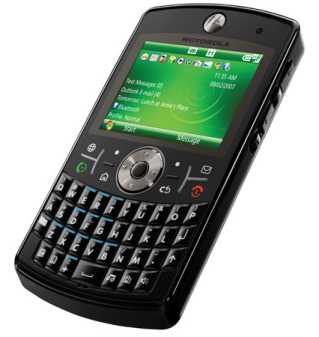
Motorola Q9h

So I wrote Motorola recently to see if they would like to cooperate in my effort to port Linux and Android to the Q9h, and although a couple of engineers on the motodev site seemed enthusiastic, I still haven't heard any kind of definitive reply.

The next logical step was to disassemble a broken Motorola Q9h I found on eBay :) I'm not entirely finished this tear-down yet, because I'm still trying to pry-off a few remaining EMI shields, but its coming along smoothly.

 I'd have to say, that I'm amazed with all of the components that went into this device from various vendors. Of course, there's the TI OMAP2420, a TI power management chip, some Samsung memory, Elpida memory, a Broadcom (I'm guessing bluetooth) transceiver, several FreeScale parts that I haven't yet identified, the SiRF 5000 AGPS receiver, a few random sensors (ambient light, ...), etc.

I'll be specifically looking for a 'companion chip' sort of like the TWL4030, to see what I can get out of the USB pins. I believe that D+ / D- are not fully muxed with UART2, but they are with GPIO 107 / 108, which means I might have to write a small soft-uart driver for the Linux kernel. 

Most of the Linux-OMAP code for the 2420 device is already present upstream in the kernel (mainly written by Nokia engineers), so in terms of the Linux porting effort, it's really just a matter of configuration. There may be a couple of non-standard peripheral devices, but I'm not expecting any major difficulties.

I hope you eagerly await some photos of the internals :) I'll have to take a pause in order to get back to the library and resume studying for my wireless communication exam, but I should be done the teardown in another day or two.

Wish me luck!

Update-20091002: Teardown
Update-20091002: OpenEZX Page

20090915

Gentoo BootSplash for ARM FrameBuffers

With Gentoo now running on several mobile devices, including the OpenMoko devices, HTC Wizard, and one that I'm still unable to mention due to NDA, I thought that it would be advantageous to be able to package splashutils for ARM devices in order to make the Gentoo boot process as visually appealing as others (notably Angstrom).

One major blocker in that process was being able to (cross-)compile klibc for ARM devices. Although that has been working well for a couple of years already, klibc was unavailable for Gentoo / ARM without an arm keyword. So I had to edit the klibc ebuild considerably and make it cross-compile friendly. In the process I added a couple of useful features and bug-fixes that were already in OpenEmbedded, like wc, losetup, etc. You can see the efforts of my klibc ebuild at Gentoo's Bugzilla under bug #284957. It's currently working without any issues. Incidentally, the ebuild configures for the ARM EABI if it's applicable.

Once that was ready to go, I contacted Spock and he assured me that his splashutils would work for generic framebuffers, and not just vesa or vga style devices. Then, it was just a matter of emerge-ing splashutils, and creating a theme.

I chose to modify the natural_gentoo theme because it was relatively clean-looking and recent. There are definitely hundreds of themes to choose from though. Here are the modified version for resolutions 240x320 (silent), 240x320 (verbose), 320x240 (silent), and 320x240 (verbose). My 240x320.cfg file is available here and a feature request has been added at Gentoo's Bugzilla under bug #285088.


Note: Ned Ludd and Angelo from #gentoo-embedded had apparently done this a year ago, but I guess they hadn't submitted it to the main portage tree. I was unaware of their efforts unfortunately, and maybe could have spared myself some time if I would have known about it beforehand.

20090821

Android ARMv4T Donut Patch

On my most recent flight from Canada to Germany, and in spite of having a great conversation with a single-serving friend, I got a bit bored and decided to try and build Donut for ARMv4T, which is quite unstable at the moment. The single-serving friend, whose name I never learned, was in a very similar boat as me - he said he was in the middle of an MSc in biomedical engineering in Lyon, and was originally from Kentucky. It's nice to actually have a decent conversation on an overseas flight for a change.

Anyway - back to the topic at hand.

The reason I'm working on the Donut branch of Android, and patching it for ARMv4T, is that I would eventually like to use it on my OpenMoko FreeRunner, which currently uses Android-Cupcake from KoolU / Michael Trimarchi. Although the generic Donut branch now builds successfully with my patch, I still need to migrate all of the hardware-specific FreeRunner changes that KoolU (any many others) made.

If you feel interested in starting from the upstream end and working downstream, as opposed to starting from KoolU git and working upstream, then check out my patch (update: see bottom of post for updated patches) and give me some feedback. I'm not inclined to submit it upstream yet, without having tested out an an actual device, so it's in very early stages right now, but it definitely builds.

You'll need to create a buildspecs.mk file, like the one below, and put it in the base of your android build directory:

TARGET_SIMULATOR := false
TARGET_BUILD_TYPE := release
TARGET_ARCH_VERSION := armv4t

Happy hacking!

update-20090824: android-donut-armv4t-20090824.patch
update-20090825: android-donut-armv4t-20090825.patch
  • While working on the above patch, I discovered that a lot of upstream work has been done on Android under the hood to support ARMv4T. That includes v4T assembly optimization for opencore, dalvik, etc. Bottom line - this is good for the FreeRunner! However, there are still a few places which need improvement though, and equivalent v4 asm. I filled in some of the gaps (external/opencore/codecs_v2/video/m4v_h263/enc/src/fastquant_inline.h) last night, but the rest are mainly all of the files that think CLZ is an V4 ARM instruction (sheesh!). They were easy enough to convert to C-equivalent code.
  • Recently Michael Trimarchi also announced some work was underway to integrate the libGlamo code into Android's GL. Not too shabby! Perhaps we might see an accelerated Android on the OpenMoko FreeRunner in the near future!
  • I recently put some thought to the Glamo's limited 511x511 buffer and limit of 7Mb/s to memory. Sure, it sucks, that we can't do everything at 640x480 (as advertised), but aren't there other ways to get around it? Such as performing acceleration on one quadrant of the FB at a time? Or switching to/from a lower or higher resolution when playing video / games ? We essentially have to beg for, borrow, cheat & steal those accelerated pixels if acceleration is to work.
update-20091017: android-donut-armv4t-20090825-1.patch
update-20091214: Please see my newer post for a continuation of the effort.

20090711

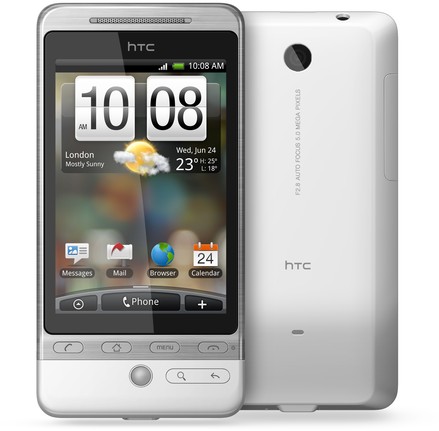
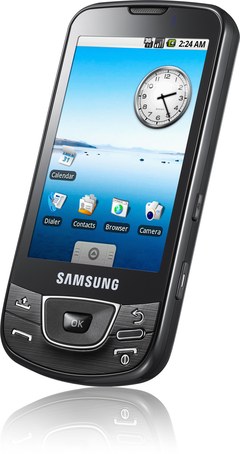
HTC Hero vs Samsung Galaxy


I've been wowing over these two devices approximately for the last couple of months, and decided that it's finally time to make a decision.

Both the Samsung Galaxy and the HTC Hero use the same SoC (who isn't?) - the Qualcomm MSM7200A, a 528 MHz ARM1136EJ-S core, using the ARMv6 ISA. The MSM7200 includes a 3D acceleration unit and a Qualcomm DSP, making it very suitable for any multimedia application. I do believe that the 3D acceleration unit still lacks full support under Linux/Android (much like the OMAP3530/PowerVR). Both handsets have a 5MP camera, although no secondary camera for video calling. They both have 802.11b/g, bluetooth, etc. The display on both devices is 320x480 pixels. Major differences are that the Galaxy has several more buttons (e.g. volume control), much more internal storage space, and a very power efficient AMOLED display, while the Hero sports the new Sense(R) UI, integrated Adobe Flash, more RAM, and multi-touch support.

I thought I would summarize. For those who would like to see a detailed comparison of the two devices, check out this link from pdadb.net .

HTC HeroSamsung Galaxy
RAM (MB)288128
Flash (MB)5127630
Connectorext-USB
(mini-USB compatible)
micro-USB
Battery (mAh)13501500
Display Depth16-bit
(65-thousand colours)
24-bit
(16-million colours)
Display TypeTransflective TFT
(standard)
AMOLED
(very low power)
Multi-Touch?YES!NO!
Price (€)485,97 (Amazon.de)476,98 (Amazon.de)

So far, I have not had a chance to examine either of these devices in any detail, but from what I have read, the Hero does support multi-touch. Until now, most sources have stated that the Galaxy does not support multi-touch. However, that might only be due to the fact that Android did not support multi-touch in software until the Hero came out. Perhaps the Galaxy has hardware support for multi-touch. Who knows with any certainty? I've read that the Galaxy actually has a capacitive touchscreen, so multi-touch does not seem that far off. The Galaxy also lacks Google-branding, which (aside from lacking some cover-art) means that software updates are not transferred over the air. Rather, updates must be performed manually with a USB cable, which some users might actually prefer.

Let's start with the Hero. I like that it has a large amount of RAM a great UI that supports multi-touch. The RAM will come in handy for streaming media (i.e. video) and fast context switching (Android's OOM process killer will not be called as frequently). As for multi-touch, I think you would probably agree, that there really is no alternative for pinch-zooming in the browser, or easy photo rotations. Now, the Galaxy - the fact that it's missing some RAM has been somewhat accounted for with the built-in 8GB of storage. As far as the screen goes, AMOLED spells very low-power (I love it) and still supports a true-colour (16million level) display. That will make it excellent for viewing any type of video or looking at photos. However, if the Samsung hardware truly does not support multi-touch, then I would be quite disappointed.

I have to admit, that I'm still sitting on the fence about this until I know with any certainty that the Samsung does not support multi-touch. Originally, I was thinking that the Samsung would be the best choice, without a doubt, but now I'm really considering how the extra RAM in the Hero might be beneficial. In terms of permanent storage, the Hero has more than enough, and is expandable with a micro-SD card anyway. On the other hand, the Galaxy could easily host a few operating systems on-board, or perhaps my entire collection of (decent) mp3s. This decision would definitely be easier if I knew for a fact that the Galaxy hardware did or did not support multi-touch.

20090708

Suggestions for Future OpenMoko Device

I love my FreeRunner as much as the next guy. The truth is, though, that there are some serious improvements that could be made to the OpenMoko hardware - some purely for usability, and some to fix a couple of plaguing, nasty bugs. The suggestions below would really turn something like the FreeRunner into a truly portable computing device - not just another iPhone clone.

I've collected a few of my own suggestions below
  • use capacitive instead of resistive touch-screen (for multi-touch gestures)
  • switch to a newer generation SoC, such as the Qualcomm MSM7200A
    • newer ARM ISA (e.g. enhanced, jazelle, dsp, etc)
    • integrated video codec (ditch the Glamo)
    • integrated 3D graphics (again, ditch the Glamo)
    • integrated GPS receiver - just needs internal antenna
  • get rid of external GPS antenna connector (use internal instead)
  • add dedicated power connector (e.g. Nokia 6620)
    • built-in circuitry for 'software-free' battery charging (see discharged battery bug)
    • support charging from 1st USB if dedicated power supply is absent (1st port should be USB OTG)
  • add 2nd USB for use as dedicated host port
  • add a mini-dvi video output
  • add an ambient light sensor (auto backlight control in software)
  • a 5MP photo / video camera and 1.3MP camera for video chat.
A couple of incidentals 1) switch to using 100% recycled materials for the casing, if it already isn't, 2) use AMOLED display technology to prolong battery life.

Comments?