Several people have responded to my previous ARMv4T patch for the "Donut" branch of Android, and have provided excellent feedback.
I recently checked out the code again, and thought that it would be wise to do some rigorous testing of all native binaries on the Android filesystem.
Please find an updated (but still incomplete) patch for ARMv4T here.
I've thrown together a small script to disassemble and check binaries for invalid opcodes. You can find the output here.
The output shows which executables and shared libraries still have non-ARMv4T machine code, and currently only 103 of 160 components pass the test. Therefore, there is still quite a bit of work to be done. For the remaining 57 components that fail, the illegal (non-ARMv4T) opcodes are also revealed.
NB: Just in case you find diffs generated with 'repo diff' just as annoying as I do, you can use this utility to automate the patching process.
update-20091215: The build system is doing "ok", but its still not perfect. Independent of compile-time issues are, of course run-time issues. The most major issue is the subject of dynamic code generation and you can read some of my thoughts here. To address the issue, I will be working with the android-on-freerunner people. For any further discussion about this topic, I suggest you join the android-on-freerunner mailing list.
Showing posts with label openmoko. Show all posts
Showing posts with label openmoko. Show all posts


20090708
Suggestions for Future OpenMoko Device
 I love my FreeRunner as much as the next guy. The truth is, though, that there are some serious improvements that could be made to the OpenMoko hardware - some purely for usability, and some to fix a couple of plaguing, nasty bugs. The suggestions below would really turn something like the FreeRunner into a truly portable computing device - not just another iPhone clone.
I've collected a few of my own suggestions below
- use capacitive instead of resistive touch-screen (for multi-touch gestures)
- switch to a newer generation SoC, such as the Qualcomm MSM7200A
- newer ARM ISA (e.g. enhanced, jazelle, dsp, etc)
- integrated video codec (ditch the Glamo)
- integrated 3D graphics (again, ditch the Glamo)
- integrated GPS receiver - just needs internal antenna
- get rid of external GPS antenna connector (use internal instead)
- add dedicated power connector (e.g. Nokia 6620)
- built-in circuitry for 'software-free' battery charging (see discharged battery bug)
- support charging from 1st USB if dedicated power supply is absent (1st port should be USB OTG)
- add 2nd USB for use as dedicated host port
- add a mini-dvi video output
- add an ambient light sensor (auto backlight control in software)
- a 5MP photo / video camera and 1.3MP camera for video chat.
Comments?
20090627
Hello, Native Android World!

First of all, create a regular Android project in Eclipse, following the Hello Android tutorial, except
- change the project name to HelloNativeAndroid
- change the class name to be HelloNativeAndroid
- change the package name to be com.christopherfriedt.android, or something similar
HelloNativeAndroid.java:Open up a shell in the 'src' directory of your project and run
package com.christopherfriedt.android;
import java.io.*;
import java.util.zip.*;
import android.app.Activity;
import android.os.Bundle;
import android.util.Log;
import android.widget.TextView;
public class HelloNativeAndroid extends Activity {
private native String greet();
/** Called when the activity is first created. */
@Override
public void onCreate(Bundle savedInstanceState) {
super.onCreate(savedInstanceState);
TextView tv = new TextView(this);
tv.setText( greet() );
setContentView(tv);
}
static {
String pkg = "com.christopherfriedt.android";
String cls = "HelloNativeAndroid";
String lib = "libHelloNativeAndroid.so";
String apkLocation = "/data/app/" + pkg + ".apk";
String libLocation = "/sdcard/" + lib;
File f = new File(libLocation);
if ( ! f.canRead() ) {
Log.d( cls, "'" + libLocation + "' not found, proceeding to installation" );
try {
ZipFile zip = new ZipFile(apkLocation);
Log.d( cls, "found ZipFile " + apkLocation );
ZipEntry zipen = zip.getEntry("assets/" + lib );
if ( zipen == null ) {
Log.d( cls, "unable to find ZipEntry '" + "assets/" + lib + "'" );
} else {
Log.d( cls, "found ZipEntry '" + "assets/" + lib + "'" );
}
InputStream is = zip.getInputStream(zipen);
Log.d( cls, "opened InputStream" );
OutputStream os = new FileOutputStream(libLocation);
Log.d( cls, "opened OutputStream " + libLocation );
byte[] buf = new byte[4096];
int n;
while ( (n = is.read(buf)) > 0 ) {
Log.d( cls, "read " + n + " bytes from InputStream" );
os.write(buf,0,n);
Log.d( cls, "wrote " + n + " bytes to OutputStream" );
}
os.close();
Log.d( cls, "closed OutputStream" );
is.close();
Log.d( cls, "closed InputStream" );
} catch( Exception e ) {
Log.e( cls, "failed to install native library: " + e );
}
}
try {
Log.d( cls, "attempting to load " + lib );
System.load( libLocation );
//System.loadLibrary( cls );
Log.d( cls, "loaded " + lib );
} catch(Exception e) {
Log.e( cls, "failed to load native library: " + e );
}
}
}
javac com.christopherfriedt.android.HelloNativeAndroid.java
javah com.christopherfriedt.android.HelloNativeAndroid
Make a subdirectory in your Android project, called for example 'C', and then copy the resulting com_christopherfriedt_android_HelloNativeAndroid.h (created with javah), to the 'C' folder.
Next, create the following files:
HelloAndroid.c:#include "com_christopherfriedt_android_HelloNativeAndroid.h"
#define GREETING "Hello, Native Android!"
JNIEXPORT jstring JNICALL Java_com_christopherfriedt_android_HelloNativeAndroid_greet
(JNIEnv *e, jobject o) {
return (*e)->NewStringUTF(e,GREETING);
}
Makefile:
CROSS = arm-softfloat-linux-gnueabi- CC = $(CROSS)gcc STRIP = $(CROSS)strip JDK_HOME = /opt/sun-jdk-1.6.0.14 PKG = com_christopherfriedt_android CLASS = HelloNativeAndroid DEBUG = CFLAGS = -O2 -pipe -Wall -march=armv4t -mtune=arm920t \ -I$(JDK_HOME)/include -I$(JDK_HOME)/include/linux LDFLAGS = -fPIC -shared -nostdlib -Wl,-rpath,/system/lib ifneq ($(DEBUG),) CFLAGS += -g endif SOBJ = lib$(CLASS).so all: $(SOBJ) $(SOBJ): $(PKG)_$(CLASS).h $(CLASS).c $(CC) $(CFLAGS) $(LDFLAGS) -o $(SOBJ) $(CLASS).c ifeq ($(DEBUG),) $(STRIP) --strip-unneeded $(SOBJ) endif clean: rm -f $(SOBJ) install: all cp $(SOBJ) ../assets
Then run 'make', and 'make install'. Build your Android project, and it will now have libHelloNativeAndroid.so bundled in the .apk file, inside the 'assets' directory (you can easily view the contents of it with unzip -l, because it's just a zip file).
Then install the .apk file using the android debug bridge (adb), with 'adb install HelloNativeAndroid.apk'.
Open the application up on your mobile, or in the emulator, and you should see something resembling the screenshot below.
Some notes:
- My target was a Neo FreeRunner from OpenMoko, hence the -march=armv4t -mtune=arm920t . Feel free to change that to something like -march=armv5te as appropriate
- In the Makefile, adjust the path to your JDK as appropriate
- The rpath argument is necessary so that the native Android linker will know to link the shared object to /system/lib/libc.so, which is from the Bionic C library
- The -nostdlib option is required so that the shared library does not require libc.so.6, which would actually refer to glibc
- The shared library will be extracted to /sdcard/libHelloNativeAndroid.so, so you'll need that folder to exist and be writable on your device
Acknowlegements:
- http://android.wooyd.org/
- http://honeypod.blogspot.com/2007/12/shared-library-hello-world-for-android.html
20081231
Shape-Writing or "Swyping"
Shape-writing, or "swyping" (instead of typing) seems to be the newest trend among touchscreen enabled devices. Of course, along with any new idea comes a slew of conflicting software patents that were accepted (where else?) at the United States Patent Office.
I believe that Apple, the original T9 creator, and Shape Writer Inc each have patents for what is essentially the same 'technology'. Please humor my quoted use of the word technology, because I am one of several billions of people who do not believe that software (which is what this is) should be patented.
This technology is very interesting in that it uses 'intelligent algorithms' to determine what word the user is trying to write. I thought that I would outline the fundamentals of these intelligent algorithms, just in case anyone in the FLOSS universe would like to implement them for a fun project in their spare time.
First of all, let's define the path that the users' finger or stylus traces on the touch screen. There exists 1) a starting point, 2) a finite number of 'corners'. If we assume that such a trace or path lies atop a coordinate system, for example, the imaginary plane, then the sequence of 'corners' simply become ordered coordinates in the complex domain.
Let's use a box, for example.
[ (0 + 0j), (0 + 11j), (11 + 11j), (11 + 11j), (0 + 0j) ]
The above set of ordered coordinates traces a box, starting at the origin, and continuing clockwise. The area of the box is (11x11) units squared.
In fact, the sequence of ordered coordinates comprimises a signal in the complex spatial domain (i.e. a 1-D signal), and as such (making several rudimentary assumptions), it can be mapped to a different coordinate space (the frequency domain), using the DFT (discrete fourier transform).
The most interesting part of this, I find anyway, is that taking the IDFT (inverse discrete fourier transform) of the 0-frequency component of such a signal, actually the 'mean', results in a single point lying at the geometric center of the box (i.e. the center of mass). Furthermore, the IDFT of the first two components result in a ellipse containing all points defined in the signal. As one would expect from summing successive components of a fourier representation, IDFTs of the next successive components result in a shape that increasingly resembles the original signal (i.e. a box).
It's pretty cool, at any rate. I had a lab excercise in Grundlagen der Geometrische Signalverarbeitung (Introduction to Geometric Signal Processing) in my first year at Uni-Kiel, which used a Christmas tree as an example.
In any event, if you define several points of interest in the complex domain, by overlaying the center-points of an on-screen-keyboard, then by careful application of Z-domain filtering, it's possible to determine the exact word that a person is trying to 'swype'. The Z-domain filtering is linear, and also unfortunately non-linear in nature. Why? Well, if you consider that corners represent signal components, then if a letter included in the signal just happens to be underneath the path, where no corner exists, then it's as if a component in the signal has been 'lost' during 'transmission'. It's as if higher frequency components are actually filtered out, so the 'intelligent' part of this algorithm is trying to associate a signal with another signal containing higher frequency components. This can be done, for example, by maximum likelihood or MMSE methods.
Alternatively, given a large enough sample group of input / output pairs, this problem can be solved quite easily using a lexicon or word association database. Given a path with a certain number of components, or corners, one should be able to do a very fast search to look up associated words in order of decreasing probability.
Ta Da!
I'm fairly certain that this 'technology' will be implemented in Android. However, I would also like to see it in the OpenMoko project.
Maybe such an app has already existed in the open-source world for some time. If not, or if anyone would like to volounteer to write such an app, then I would be very open to further explaination. Just submit a comment below.
Update (20100412): It appears that Samsung has integrated the idea of 'swyping' into Android on their new(ish) Galaxy S devices, as you can see from the video below. Very Cool.
I believe that Apple, the original T9 creator, and Shape Writer Inc each have patents for what is essentially the same 'technology'. Please humor my quoted use of the word technology, because I am one of several billions of people who do not believe that software (which is what this is) should be patented.
This technology is very interesting in that it uses 'intelligent algorithms' to determine what word the user is trying to write. I thought that I would outline the fundamentals of these intelligent algorithms, just in case anyone in the FLOSS universe would like to implement them for a fun project in their spare time.
First of all, let's define the path that the users' finger or stylus traces on the touch screen. There exists 1) a starting point, 2) a finite number of 'corners'. If we assume that such a trace or path lies atop a coordinate system, for example, the imaginary plane, then the sequence of 'corners' simply become ordered coordinates in the complex domain.
Let's use a box, for example.
[ (0 + 0j), (0 + 11j), (11 + 11j), (11 + 11j), (0 + 0j) ]
The above set of ordered coordinates traces a box, starting at the origin, and continuing clockwise. The area of the box is (11x11) units squared.
In fact, the sequence of ordered coordinates comprimises a signal in the complex spatial domain (i.e. a 1-D signal), and as such (making several rudimentary assumptions), it can be mapped to a different coordinate space (the frequency domain), using the DFT (discrete fourier transform).
The most interesting part of this, I find anyway, is that taking the IDFT (inverse discrete fourier transform) of the 0-frequency component of such a signal, actually the 'mean', results in a single point lying at the geometric center of the box (i.e. the center of mass). Furthermore, the IDFT of the first two components result in a ellipse containing all points defined in the signal. As one would expect from summing successive components of a fourier representation, IDFTs of the next successive components result in a shape that increasingly resembles the original signal (i.e. a box).
It's pretty cool, at any rate. I had a lab excercise in Grundlagen der Geometrische Signalverarbeitung (Introduction to Geometric Signal Processing) in my first year at Uni-Kiel, which used a Christmas tree as an example.
In any event, if you define several points of interest in the complex domain, by overlaying the center-points of an on-screen-keyboard, then by careful application of Z-domain filtering, it's possible to determine the exact word that a person is trying to 'swype'. The Z-domain filtering is linear, and also unfortunately non-linear in nature. Why? Well, if you consider that corners represent signal components, then if a letter included in the signal just happens to be underneath the path, where no corner exists, then it's as if a component in the signal has been 'lost' during 'transmission'. It's as if higher frequency components are actually filtered out, so the 'intelligent' part of this algorithm is trying to associate a signal with another signal containing higher frequency components. This can be done, for example, by maximum likelihood or MMSE methods.
Alternatively, given a large enough sample group of input / output pairs, this problem can be solved quite easily using a lexicon or word association database. Given a path with a certain number of components, or corners, one should be able to do a very fast search to look up associated words in order of decreasing probability.
Ta Da!
I'm fairly certain that this 'technology' will be implemented in Android. However, I would also like to see it in the OpenMoko project.
Maybe such an app has already existed in the open-source world for some time. If not, or if anyone would like to volounteer to write such an app, then I would be very open to further explaination. Just submit a comment below.
Update (20100412): It appears that Samsung has integrated the idea of 'swyping' into Android on their new(ish) Galaxy S devices, as you can see from the video below. Very Cool.
20081218
Triple Booting the Neo FreeRunner
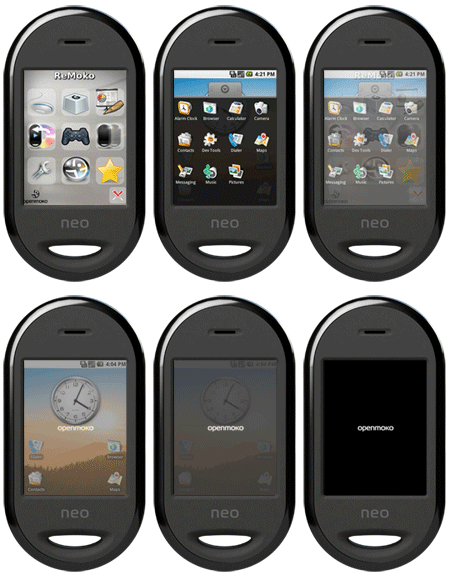
Hi everyone,
It's been a while since my last post, so I must apologize for that. Things have been very busy since November.
However, as some of you may already know, I was also experimenting with the Android operating system on my FreeRunner directly after the source code was released. In fact, I was arguably the first person to compile Android for the ARMv4T architecture. Thanks to the work of the community, it is now possible to run Android on the FreeRunner using KoolU's sources.

The private Android repository is to be merged with the official public repository sometime in Q4 2008, while the first release featuring an on-screen-keyboard will be Q1 2009. The areas I would like to concentrate on are WiFi, and Glamo improvements.
In any event, I'm currently triple-booting the FreeRunner with the latest OM image (or FDOM image), Android, and Gentoo. I'm planning using the Gentoo install for debugging things that will eventually go into the OM and Android images.
I'm using an 8GB uSD card with 4 primary partitions:
/dev/mmcblk0p1: MokoData (vfat) 5 GB
/dev/mmcblk0p2: AndroidData (ext2) 512 MB
/dev/mmcblk0p3: MokoRoot (ext2) 512 MB
/dev/mmcblk0p4: GentooRoot (ext2) 2 GB
Android is of course installed to the 'rootfs' partition in nand flash. MokoData contains uImage-android (from Sean McNeil), uImage-2008.9.bin, and uImage-2008.12.bin - the latter two are official OpenMoko kernels. I've updated the nand boot menu so that menu_2 boots OM 2008.9, menu_3 boots Android, and menu_4 boots Gentoo.
At some point in the near future, I'm hoping to create a torrent so that the configuration can be downloaded and shared by everyone in the community, but you may have guessed that Free Time(TM) is limited these days.
20081028
Android Porting Progress
Hi everyone,Sorry I haven't posted anything recently, but my days were busy with work, and then my nights were busy porting Android to the FreeRunner. In short, it's coming along, slowly but surely.
I've basically had to teach myself ARM assembly language in the last couple of days (fun, fun, fun!) and thought that I would quickly share all of useful resources that I've come across. So here they are:
The ARM Architecture Reference Manual
This is the definitive reference for pretty much everything. After reading this, I don't think I'll need any other reference material. In fact, I might even print myself a hard copy!
UNSW lab material on microprocessors and embedded systems
This is a surprisingly detailed tutorial for programming ARM in assembly language and C, which sort of bridges the gap between the two languages. It explains precisely the syntax of .S files and complies to the AAPCS (ARM Procedure Call Standard) and Thumb Procedure Call Standard (TPCS). I've archived the material for future reference in case this course website ever goes missing (which tends to happen often with universities).
Finally, the diff that I'm working from
Yes, I realize that it's pretty lame to cling to a single version of Android and not be constantly synchronizing with git and submitting code for review with gerrit, but I have no intentions of targetting anything aside from the FreeRunner / Neo1973 with my port, so I don't really want to deal with the build infrastructure right now. Ignore anything that starts with the less-compatible regular expression '^\- .*smull' (search by hitting '/') - I seem to have hastily deleted those routines in order to get my code to trivially compile before. Please, I don't recommend even trying to apply the diff as a patch - it will do nothing and may even inflict pain on some remote small kitten... and you wouldn't want that, would you? ... But seriously, the diff just highlights what code needs to be worked on. It actually has a lot of 'cruft', i.e. garbage, too, so just look for any lines matching '^\- ' that also contain one of the opcodes listed on the wiki.
Now from what I've been looking at in the code, there are 3 different options for optimizing the .S files for ARMv4T
1) using preprocessor macros for simple opcode translation
2) using globally visible AAPCS-compatible functions for emulating the v5TE instructions (this is where the UNSW tutorial has really come in handy). This is necessary for opcodes that are slightly more complicated, or ones with tricky addressing modes. The GNU preprocessor doesn't really have the capabilities to become a fully fledged scripting language unfortunately.
3) individual, call-by-call changes ... this is the ugly one that I don't really want to touch... but I'm guessing I will have to at some point.
Good luck with your porting efforts!
Chris
Enjoy!
PS: I find black sabbath very useful for putting myself into the 'zone' for programming in ARM assembly.
20081022
Android FreeRunner Updates
There obviously needs to be a different kernel configuration, but Benno has already done that.
20081021
Hello, Open-Source World!
It's official... Google's brainchild, Android, has finally saidHello, Open-Source World!
I wonder how many hours it will take for the first Neo 1973 or Neo FreeRunner port to surface. The biggest challenge, it will seem, will be to provide a bridge between the (minimal) ARMv5TE instruction set that Android was designed for, and the OpenMoko handsets' ARMv4T instruction set (as present in the Samsung 2442 SoC).
Perhaps the next handset that OpenMoko releases will feature native ARMv5TE compatibility.
Update: I've been building android for the last few hours, having made a few build-oriented changes that I think will help bridge the ARMv5TE - ARMv4T gap. I'm going to list a few of the errors I've been running into below. Please note - although I only list each undefined instruction once, the errors occur in multiplicity and in different subdirectories. I will post ARMv4T compliant work-arounds soon. Please be patient.
- bionic/libc/arch-arm/bionic/memcmp.S:44: Error: selected processor does not support `pld [r0,#0]
- system/core/libpixelflinger/t32cb16blend.S:121: Error: selected processor does not support `smulbb lr,r7,lr'
- system/core/libpixelflinger/t32cb16blend.S ... Error: selected processor does not support `smulbt ...'
- external/jpeg/jidctfst.S:148: Error: selected processor does not support `smlabb r0,r2,r3,r5'
- dalvik/vm/arch/arm/CallEABI.S:239: Error: selected processor does not support `blx ip'
- dalvik/vm/mterp/out/InterpAsm-armv5.S:2653: Error: selected processor does not support `ldrd r2,[r0,#offStaticField_value]'
- dalvik/vm/mterp/out/InterpAsm-armv5.S ... Error: selected processor does not support `strd ...'
- external/sonivox/arm-wt-22k/lib_src/ARM-E_mastergain_gnu.s:77: Error: selected processor does not support `smulwb r4,r4,nGain'
- external/sonivox/arm-wt-22k/lib_src/ARM-E_voice_gain_gnu.s:114: Error: selected processor does not support `smlawb tmp1,gainLeft,tmp0,tmp1'
- external/opencore//codecs_v2/audio/aac/dec/src/calc_auto_corr.cpp
/tmp/ccBi9nUH.s: Assembler messages:
/tmp/ccBi9nUH.s:652: Error: selected processor does not support `clz r0,ip' - smultt, smlatt, smlawt, smulwt, qadd, qsub, qdadd, qdsub, smlabt
- etc, etc, etc ...
- out/target/product/generic/obj/SHARED_LIBRARIES/libdvm_intermediates/Misc.o: In function `dvmAllocBit': dalvik/vm/Misc.c:247: undefined reference to `ffs'
- The first is to ] replace [ the red-highlighted mnemonics using an equivalent ARMv4 or ARMv4T instruction sequence. In some cases, this is impossible without a lot of context information.
- The second is to completely re-implement each section from scratch, wherever one of the ARMv5TE instructions are issued, but using an algorithm optimized for the ARMv4 or ARMv4T architecture
- The third option is to just remove it, e.g. for the pld instruction which only optimizes memory fetches by hinting (or not?)
20080917
My FreeRunner Debug Board v3 Has Arrived
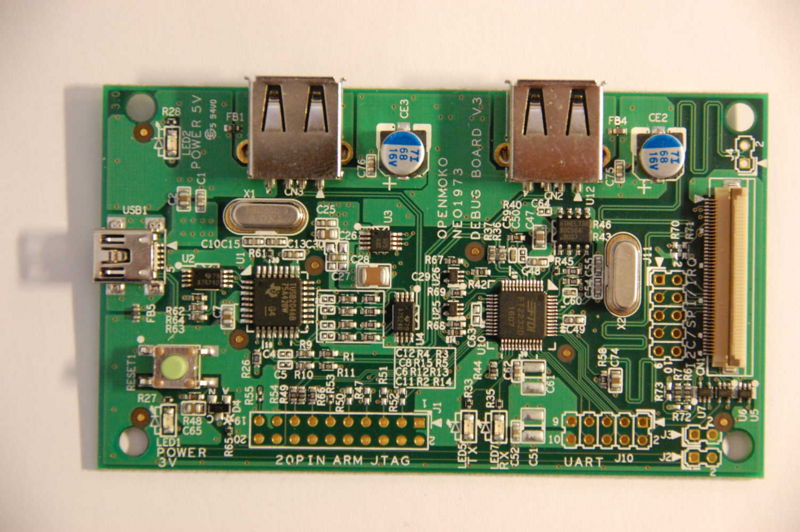
Well, I finally received the Debug Board v3 that I've been hounding Koolu for ever since I received my FreeRunner. The Dboard, as it's sometimes called, provides a JTAG interface to the Neo FreeRunner from OpenMoko / FIC and can also be interfaced with any other ARM device via the unpopulated 20-pin JTAG header at the bottom of the image. I'm particularly interested in trying out BeagleBoard debugging with my Dboard after I build a 20-pin to 14-pin adapter.
It's a good thing that I ordered my Dboard from OpenMoko directly because Koolu has publicly stated that they will not be offering the Debug Board to their customers because the FreeRunner is unbrickable. Although, by assuming that the Debug Board's only use is for bootloader debugging, it precludes all sorts of other uses for the board such as step-debugging with GDB through static firmware images, kernel debugging, or the potential of debugging, say, Android, NetBSD or any other OS.
I'm happy now that I have mine anyway. I hope that they don't stop mass production of the Dboard either, because it might be a more versatile alternative than the FlySwatter, although both offer freely available schematics.
If anyone out there has experience JTAG debugging with both the FlySwatter and the Debug Board v3, then I would be very happy to hear comments detailing the pros and cons of each.
20080905
Toolchain for the Neo FreeRunner
 Well, it's been a while, hasn't it !?
Erin, Jules, & I were all quite busy over the last few weeks - we travelled all over the lower half of Ontario, and then went camping at Bruce Peninsula National Park & on Manintoulin Island.
(Note to self, make Google map containing a trail of our route + photos)
We're now back in Montreal, and it's pretty intense. I have 4 exams coming up in the next 3 weeks and will surely have my hands full for all of them. Hopefully the examination board at the Uni-Kiel allows me to write the exams remotely from Montreal, given my special circumstances (baby, f/t job, etc), so that I don't have an overly-demanding schedule when I return in March / April.
Soooo wie so, I was pleased to receive my new Neo FreeRunner mobile phone when I got back to Montreal. Last week I upgraded the firmware to om2008.8 which has a slick, webkit-based UI. After having used it for a week, I can honestly say that this guy will be the iPhone killer, for anyone who likes to do extreme things with mobile devices at least.
My EEE PC is doing very well, and another one is on the way for Erin. I was hoping that it would get here in time for her birthday, but it seems that there is an 8-10 week shipping delay from the Royal Bank!!! Daaaamn!!!
In a few days, I'm expecting to receive a BeagleBoard in the mail along with a 15.1" touchscreen panel - I can't wait ;-) Then is a cipherlabs 9400 handheld for industrial scanning. I'll be putting linux on that too.
I really have to say, though, that I'm really starting to feel the lack of a graphical package manager for Gentoo-based mobile devices. Seeing how it's my job now to implement a web-based, distributed (pushing) package management system, I don't think it will be very hard for me to implement a mobile (pulling / normal) graphical package manager.
There's another guy on the gentoo-embedded list from Portugal, named Ângelo (a.k.a. miknix), who is also aiming to do the same thing with the HTC Wizard (also a pretty sweet-looking handheld w/ integrated keyboard).
Anyway, if there are any Gentoo users out there who would like to download an i686-pc-linux-gnu -> armv4tl-softfloat-linux-gnueabi cross-toolchain suitable for OpenMoko cross-compilation, then check out my latest toolchain. Please don't forget to read the README file.
I guess the next cross toolchain I come up with will target the armv7a-c6x-linux-gnueabi BeagleBoard, which also happens to have Jazelle Technology (something I have wanted to experiment with for a while!).
20080603
Why Don't Manufacturers Build Mobile Phones to Last?
 I bought a Motorola L2 14 months ago from a Fido store in Toronto - I was quite happy with it, considering that all I really ever want in a cellular phone is the ability to talk. The L2, although nothing special by today's standards, was a major step up for me because it had a colour LCD (Wow!!). Aside from that, it was my first major introduction to Google Mobile applications, such as Gmail and Google Maps. I was quite satisfied with the Motorola L2 - until the keys became completely unresponsive! Yes, only 2 months after the warranty had expired, the keys became fully unresponsive! I brought the device back to the nearest Fido outlet and they said it was most likely a short circuit they would not replace the handset, understandably, but also would not repair it. My L2 had not done much more than sit on a desk for the year that I owned it. Usually I used it for little more than a watch! It never got wet or experienced a single fall! Maybe dust was an issue, but it really shouldn't be.
 In my opinion, if portable electronics are not built to last, then the manufacturers should be providing either recycling or repair facilities directly to the consumer. There are an estimated 130 million mobile phones disposed of annually in the U.S. alone!
In many cases, a large portion of the mobile phones depicted left were probably fully functional when they were disposed of. In many other cases, a replacement part is all that's necessary to restore the phone to its original fully working state.
 I fell back to my previous mobile and it works marvellously!! That was a much more modest device - a DRASTICALLY more modest device than what is common by todays standards. It was a Siemen's A56, with a monochrome display ;-) These sort of devices were built to last !!
Oddly enough, you never see mobiles like this being sold in North America anymore, because the retailers have told us that we need colour LCDs, with games and cameras, and iTunes built-in. But if the phone doesn't work as a phone, what good is the rest?
The Siemen's should be fine for me until the OpenMoko / eo1973 GTA2 is being sold to the general public.
20080523
Improperly Credited Article on Slashdot
 Slashdot is a funny place - don't get me wrong, I love to read it. The only problem I've ever had with it is that they edited the OpenMoko article I wrote on their site, and now someone else is claiming to have written it (kdawson).
Originally when I wrote the article, it was credited to 'Anonymous Coward'. I did that on purpose so that I wouldn't make anyone in the OpenMoko community offended, seeing as how they may have wanted to make a post themselves. I just wanted to beat them to it!
In my opinion, the article should have remained credited to 'Anonymous Coward' as opposed to kdawson, whoever the hell that is. Apparently kdawson believes that it is completely fine to assign credit of a work to someone who had nothing to do with the work at all.
What I find even funnier, is that I made a comment to the post I wrote only a week after noticing it was no longer attributed to 'Anonymous Coward'. Then the editors changed it back. Now, approximately 6 months later, someone else has again inappropriately taken credit for another's work.
What's the lesson in all of this? Always post under your real name if you intend to have something show up in the slashdot headlines. I guess I shouldn't feel bad then for copying the Slashdot logo to use with this post :)
Subscribe to:
Posts (Atom)